Evaluating the Business Card Display Mockup for Professional Branding
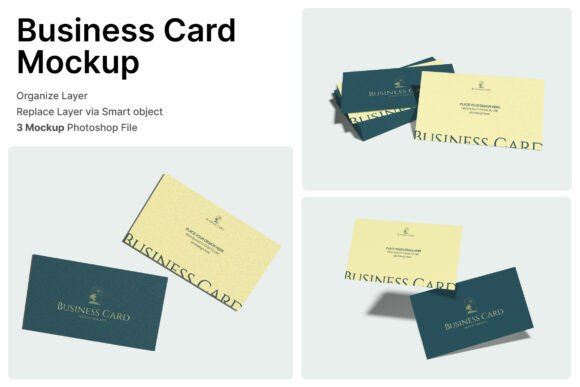
In the competitive landscape of modern branding, first impressions are often digital before they are physical. A Business Card Display Mockup serves as a critical bridge between a flat design file and the tangible reality of how a brand presents itself to the world. For professionals, entrepreneurs, and creative freelancers, the ability to visualize a business card in a realistic setting is not merely an aesthetic luxury; it is a functional necessity for client presentations, portfolio development, and marketing strategy. This specific asset, characterized by its high-resolution output and smart object functionality, offers a streamlined workflow for those who need to showcase identity designs with precision and clarity.
The core value of this mockup lies in its technical foundation. Built as an Adobe Photoshop (PSD) file, it leverages the industry-standard software's most powerful feature: Smart Objects. This technology allows users to replace placeholder imagery with their own designs without altering the underlying lighting, shadows, or perspective of the scene. The result is a photorealistic presentation that maintains the integrity of the original photograph while accurately displaying the user's artwork. With dimensions of 3000x2000 pixels at 300 DPI, the file provides sufficient resolution for both high-quality web display and professional print proofs, ensuring that details remain crisp regardless of the medium.
Technical Specifications and Workflow Efficiency
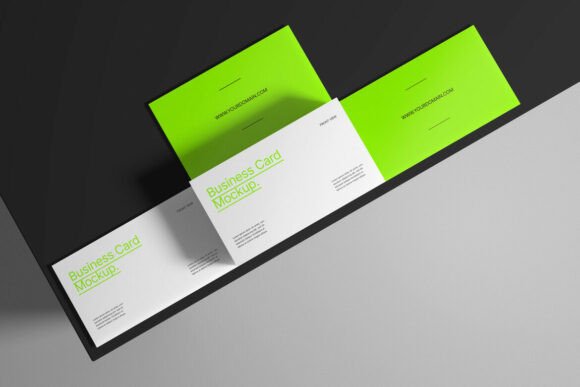
When evaluating any creative asset, the balance between quality and ease of use is paramount. This Business Card Display Mockup is engineered to minimize friction in the design process. The inclusion of organized layers is a significant advantage for users who may need to adjust specific elements of the composition. Unlike flattened images or lower-quality templates where background adjustments are impossible, this file structure permits customization of background colors and other environmental factors. This flexibility ensures that the final image aligns perfectly with a brand's color palette or a specific campaign theme.
The workflow for utilizing this tool is straightforward yet robust. Upon opening the PSD file in Adobe Photoshop, the user encounters a pre-arranged scene featuring model images and photographs intended for presentation purposes. It is important to note that these models are part of the template's visual context and are not included as separate assets for independent use; they serve strictly as the stage for the user's design. To insert a custom business card, the user simply locates the designated Smart Object layer, double-clicks the thumbnail, and pastes their design into the new tab that opens. Once saved and closed, the main document automatically updates, wrapping the design around the card with accurate perspective and lighting effects.
This method eliminates the need for complex masking, shadow creation, or perspective warping, tasks that can consume hours of manual labor. For busy marketers and small business owners, this efficiency translates directly into cost savings and faster turnaround times. The consistency provided by the mockup ensures that every variation of a business card—whether testing different paper stocks, finishes, or logo placements—is presented under identical lighting conditions, allowing for an objective comparison of design choices.
Practical Applications Across Industries
The utility of a high-fidelity Business Card Display Mockup extends across a diverse range of professions. For graphic designers and branding agencies, it is an indispensable tool for client deliverables. Presenting a logo on a flat white background often fails to convey the tactile quality of the final product. By placing the design within a realistic context, designers can help clients visualize the end result, reducing ambiguity and accelerating approval processes. The psychological impact of seeing a design "in the wild" often instills greater confidence in the client regarding the designer's capabilities.
Freelancers and creators building online portfolios also benefit significantly from this resource. Platforms like Behance, Dribbble, and personal websites rely heavily on visual storytelling. A generic screenshot of a business card design may appear amateurish, whereas a rendered mockup suggests a level of professionalism and attention to detail that attracts higher-quality clientele. The 3000x2000 pixel resolution ensures that these images look sharp on retina displays and large monitors, which is crucial for maintaining a polished digital presence.
Furthermore, small business owners and entrepreneurs who manage their own marketing materials can use this tool to test concepts before committing to expensive print runs. By visualizing how a specific font weight or color contrast appears on a physical card, they can make informed decisions that prevent costly errors. Educators and publishers teaching design principles can also utilize such mockups to demonstrate the importance of context in visual communication, showing students how environment and lighting influence the perception of a brand.
Quality, Realism, and Limitations
The effectiveness of any mockup depends on its realism. This particular asset succeeds by incorporating nuanced details such as subtle surface textures, accurate shadow casting, and natural depth of field. These elements contribute to a sense of authenticity that flat designs cannot achieve. The high resolution (300 DPI) ensures that when zoomed in, the edges of the card and the texture of the paper stock remain defined, avoiding the pixelation that plagues lower-quality templates. This attention to detail supports the principle of E-E-A-T (Experience, Expertise, Authoritativeness, and Trustworthiness) by providing a tool that reflects professional standards.
However, users must approach this tool with a clear understanding of its scope. While the background colors are customizable, the fundamental composition—the angle of the card, the position of the models, and the lighting setup—is fixed within the PSD structure. For projects requiring a highly specific or unconventional angle, this template may need to be supplemented with other assets. Additionally, as noted in the usage instructions, the model images and photographs are for presentation purposes only. Users cannot extract these figures for use in unrelated advertising campaigns without potentially violating licensing terms associated with the stock photography used to create the mockup.
Another consideration is the software requirement. Since the file is an editable PSD, access to Adobe Photoshop is mandatory. Users relying solely on free or web-based design tools will not be able to leverage the Smart Object functionality that makes this mockup efficient. While there are online mockup generators available, they often lack the layer organization and customization depth found in a native Photoshop file, particularly regarding background color adjustments and fine-tuned layer visibility.
Long-Term Value and Strategic Integration
Investing time in mastering a reliable Business Card Display Mockup yields long-term dividends for any creative workflow. Unlike one-off generators that require re-uploading files for every iteration, a local PSD file can be reused indefinitely. Designers can build a library of variations, saving different versions of the Smart Object content to quickly generate multiple options for A/B testing or client reviews. The organized layer structure facilitates this archival process, making it easy to return to a project months later and make adjustments without starting from scratch.
From a strategic perspective, consistent use of high-quality mockups contributes to a cohesive brand identity. When all marketing materials, from social media posts to pitch decks, utilize the same standard of visual presentation, the brand appears more established and trustworthy. This consistency is particularly vital for startups and solopreneurs looking to compete with larger entities. The professional polish provided by a 300 DPI, well-lit mockup can elevate a nascent brand's perceived value, influencing how potential partners and customers perceive the business.
In conclusion, the Business Card Display Mockup described here represents a practical, high-value resource for anyone involved in visual branding. Its combination of high resolution, smart object editing, and organized layers addresses the common pain points of time consumption and unrealistic presentation. While it requires Adobe Photoshop and adheres to a specific compositional style, its benefits in terms of workflow efficiency, client communication, and portfolio enhancement are substantial. For professionals seeking to present their work with clarity and impact, integrating this tool into their regular workflow is a logical and effective step toward achieving superior branding outcomes.