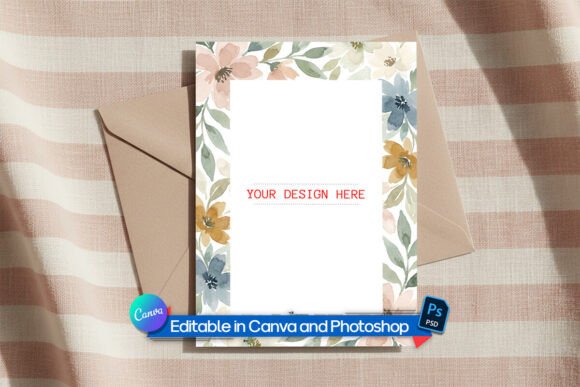
Evaluating the Professional A6 Greeting Card Mockup for Design Presentations
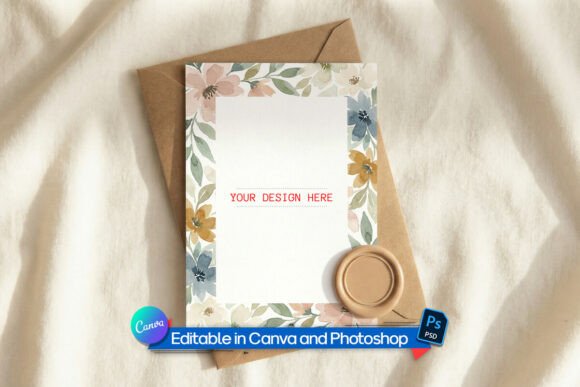
In the competitive landscape of digital design and stationery sales, the presentation of a product is often as critical as the product itself. A Greeting Card Mockup serves as a vital tool for artists, brand managers, and independent sellers to visualize their two-dimensional designs in a realistic, three-dimensional context. Specifically, the Professional A6 Card Mockup – Flat Lay Edition represents a specialized resource designed to bridge the gap between a digital file and a tangible physical object. This article evaluates the utility, benefits, and limitations of this specific type of mockup to help designers determine if it aligns with their workflow and presentation goals.
Understanding the Role of a Greeting Card Mockup
At its core, a greeting card mockup is a pre-made graphic file that allows a user to superimpose their own artwork onto a photorealistic image of a card. The Professional A6 Card Mockup focuses on the A6 dimensions (105 x 148 mm), which is the international standard for greeting cards, postcards, and small art prints. Unlike a simple digital overlay, a high-quality mockup incorporates environmental factors such as lighting, shadow casting, and paper texture.
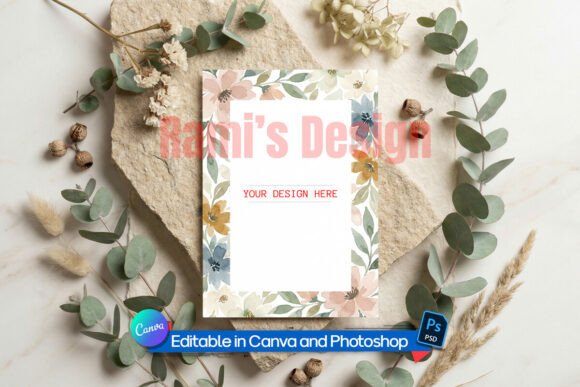
The "Flat Lay" aesthetic refers to an overhead photography style where objects are arranged on a flat surface and photographed from directly above. This style has become ubiquitous in modern marketing, particularly on social media platforms like Instagram and Pinterest, as well as e-commerce marketplaces like Etsy. By utilizing a mockup that mimics this specific lighting and angle, creators can present their work in a clean, modern setting without needing access to a professional photography studio, physical props, or camera equipment.
Key Features and Technical Capabilities
When evaluating a mockup resource, technical flexibility is paramount. The Professional A6 Card Mockup distinguishes itself through multi-platform compatibility and editable features. Understanding these specifications helps users assess whether the tool fits their current software ecosystem.
- Smart Object Integration: For users of Adobe Photoshop or the free alternative Photopea, the inclusion of a layered PSD file with Smart Objects is a significant advantage. This feature automates the application of perspective, lighting, and texture. Users simply drag and drop their design into the designated layer, and the software automatically warps the image to fit the card's geometry while applying realistic shadows.
- Canva Compatibility: Recognizing that not all designers use professional raster software, this mockup often includes a template compatible with Canva. This lowers the barrier to entry, allowing users to upload artwork directly into a pre-set frame. While potentially less nuanced than Photoshop's Smart Objects, it offers speed and ease of use for quick iterations.
- Transparent PNG Options: The inclusion of a high-resolution transparent PNG file provides versatility for users working in other design suites. This file typically comes with natural shadows and soft lighting already rendered, allowing for immediate placement onto various backgrounds without complex editing.
- Realistic Textures: A defining characteristic of a premium mockup is the simulation of physical materials. High-quality files replicate the subtle grain of cardstock and the way light interacts with matte or semi-gloss finishes, adding a layer of authenticity that flat digital images lack.
Benefits for Artists and Businesses
The primary value proposition of using a dedicated Greeting Card Mockup lies in efficiency and professionalism. For independent sellers on platforms like Etsy or Shopify, creating high-converting product listings requires imagery that suggests quality. A realistic mockup allows a seller to showcase a full catalog of designs without the prohibitive cost and time investment of printing and photographing every single variant.
Furthermore, consistency is key to branding. By using a standardized flat lay setting, artists can ensure that their entire portfolio looks cohesive. This uniformity helps in building a recognizable brand identity. For event designers and photographers, these mockups serve as effective proofing tools. They allow clients to visualize how an invitation or save-the-date card will look in real life before committing to a large print run, thereby reducing the risk of errors and miscommunication.
Considerations and Tradeoffs
While the benefits are substantial, there are tradeoffs and limitations to consider when relying on digital mockups. The most significant consideration is the potential for a "generic" look. Because many designers may access similar high-quality resources, there is a risk that multiple brands end up using identical backgrounds or lighting setups. To mitigate this, users should consider customizing the background color or adding unique props to the flat lay composition to differentiate their visuals.
Another factor is the limitation of the medium itself. A digital mockup, no matter how high-resolution, cannot perfectly replicate the tactile experience of holding a card. It simulates texture visually but cannot convey the weight of the paper or the quality of the ink. For luxury brands where the physical feel is a major selling point, a mockup should be used as a supplementary visual aid rather than a complete replacement for physical samples during the final stages of client approval.
Additionally, users must be mindful of resolution requirements. While the source file may be high-resolution, exporting images for web use requires balancing file size with clarity. Over-compressing a mockup image can degrade the realistic textures, making the final result look artificial.
Ideal Use Cases vs. Alternatives
Determining whether this tool is the right fit depends largely on the specific stage of the design process and the intended audience.
When This Mockup Is a Strong Fit
This resource is ideal for:
- E-commerce Listings: Sellers who need to populate online stores with consistent, professional imagery quickly.
- Social Media Marketing: Content creators who require a steady stream of visually appealing posts to engage followers without organizing photoshoots.
- Portfolio Development: Freelance illustrators and graphic designers who need to present conceptual work to potential clients in a realistic context.
- Rapid Prototyping: Teams that need to visualize multiple design variations side-by-side to make internal decisions.
When to Consider Alternatives
There are scenarios where a static A6 flat lay mockup may not suffice. If the goal is to demonstrate the functionality of a folded card, a single flat image may be insufficient; in such cases, a multi-angle mockup set or a 3D interactive model might be necessary. Similarly, if the card features special finishes like foil stamping, embossing, or spot UV, a standard raster mockup may struggle to accurately represent the reflectivity and depth of these elements. In these instances, custom photography or advanced 3D rendering software might yield more accurate results.
Making an Informed Decision
Selecting the right presentation tool involves weighing the need for speed and cost-efficiency against the desire for absolute uniqueness and tactile accuracy. The Professional A6 Card Mockup – Flat Lay Edition offers a robust solution for the majority of digital display needs. Its compatibility with both professional software like Photoshop and accessible tools like Canva makes it a versatile asset for a wide range of users.
For those researching options, the decision ultimately rests on the volume of work and the stage of production. If the objective is to validate designs, market products online, or build a cohesive portfolio efficiently, investing in a high-quality, editable Greeting Card Mockup is a logical and practical choice. However, for final production verification of complex physical attributes, it should be viewed as part of a broader toolkit that includes physical proofs. By understanding these nuances, designers can leverage mockups effectively to elevate their brand presentation while maintaining realistic expectations of the medium.