Why Your Food Brand Needs a Burger Shaped Die-Cut Business Card
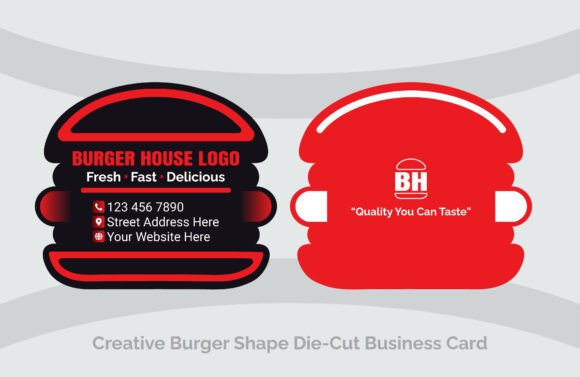
In the competitive world of food service, first impressions are often made before a customer even takes a bite. While many restaurant owners focus heavily on interior decor and menu photography, they frequently overlook one of the most tangible marketing tools available: the business card. Standard rectangular cards often end up lost in a wallet or tossed into a junk drawer. However, a Burger Shaped Die-Cut Business Card changes the dynamic entirely. It transforms a simple contact exchange into a memorable brand experience. By mimicking the actual product you sell, you create an immediate psychological connection with the recipient, signaling creativity and attention to detail.
This unique approach is particularly effective for burger shops, fast-food joints, catering services, and gourmet restaurants looking to stand out. The specific design featuring a vibrant orange and black color scheme is not just aesthetically pleasing; it leverages color psychology to stimulate appetite and convey energy. Yet, moving from a standard print job to a custom die-cut design requires careful consideration. Many entrepreneurs rush into ordering these creative cards without understanding the technical nuances, leading to wasted budgets and subpar results. Understanding the potential pitfalls before you begin ensures your investment yields the high-quality presentation your brand deserves.
Common Misconceptions About Custom Die-Cut Designs
One of the most frequent mistakes business owners make is assuming that any graphic designer can easily handle a die-cut project. While creating a visual layout is one thing, preparing a file for physical production is another. A common error involves neglecting the structural integrity of the shape. If the "bun" edges of your card are too thin or if critical text is placed too close to the cutting line, the final product may look frayed or become difficult to handle. This oversight affects usability; a card that tears easily or feels flimsy undermines the professional image you are trying to build.
Another significant misunderstanding relates to file formats. Many beginners attempt to send raster images (like JPEGs or PNGs) to a print shop for die-cutting. This is a critical error. Die-cutting requires precise vector paths to tell the machine exactly where to cut. Without a 100% vector-based file, such as AI or EPS, the printer cannot guarantee clean edges. The result is often a blurry outline or a card that doesn't match the intended shape. To avoid this, always ensure your template is built using vector shapes, which allow for infinite scalability without loss of quality.
The Importance of Color Mode and Resolution
When customizing a template like the Burger Shaped Business Card, color management is often overlooked. Designers working on screens typically use RGB mode, which displays bright, glowing colors. However, commercial printing operates in CMYK mode. If you finalize your design in RGB and send it to print without conversion, the vibrant orange in your digital proof may turn into a dull, muddy brown on paper. This discrepancy can ruin the "mouth-watering" appeal of the design. Always check that your document settings are set to CMYK and 300 DPI before exporting your final files. This ensures that the colors you see on your monitor closely match the physical card in your hand.
Furthermore, ignoring the bleed area is a recipe for disaster. In die-cut printing, the design must extend slightly beyond the cut line to account for minor shifts during the manufacturing process. If your background color stops exactly at the edge of the burger shape, you risk ending up with unsightly white slivers along the border. Professional templates usually include organized layers specifically for bleed and safety margins. Taking the time to understand these layers and populate them correctly prevents costly reprints and ensures a polished finish.
Maximizing Editability and Brand Consistency
A major advantage of using a professionally structured template is the ability to customize it efficiently. However, users often make the mistake of over-editing to the point of clutter. The strength of the burger shape lies in its simplicity and recognizability. When adding your logo, contact information, or social media handles, resist the urge to fill every inch of space. White space (or in this case, negative space within the bun) is essential for readability. If the text is too small or crowded, the card loses its functional value. Remember, the primary goal is communication; if people cannot read your phone number or website quickly, the creative shape becomes a novelty rather than a tool.
Additionally, consider the double-sided layout carefully. Some businesses treat the back of the card as an afterthought, leaving it blank or cramming it with unrelated graphics. A better approach is to use the reverse side for a specific call to action, such as a QR code linking to your online menu, a limited-time offer, or a loyalty program sign-up. Since the template offers fully editable layers, you can strategically place these elements to balance the visual weight of the card. This turns the business card into a direct marketing channel rather than just a static identifier.
Choosing the Right Materials and Finishes
While the digital file is crucial, the physical material you choose plays an equally important role in the final outcome. A common oversight is selecting paper stock that is too thin for a custom shape. Standard business card weight might feel floppy when cut into a complex silhouette like a burger. For die-cut cards, it is generally advisable to opt for a heavier cardstock, such as 14pt or 16pt, to provide rigidity and a premium feel. This enhances the tactile experience, making the card feel substantial and durable in the customer's hand.
Finishes also require thoughtful selection. A glossy finish can make food imagery pop and enhance the vibrancy of the orange and black scheme, but it can sometimes feel slippery or prone to fingerprints. A matte or soft-touch coating, on the other hand, offers a sophisticated, modern look that aligns well with contemporary dining trends. Before committing to a large run, request a physical proof from your printer. This allows you to evaluate how the ink sits on the paper, how sharp the die-cut edges are, and whether the overall weight meets your expectations. This small step can save you from receiving thousands of cards that do not meet your quality standards.
Practical Steps Before You Print
To ensure success with your Burger Shaped Die-Cut Business Card, follow a disciplined pre-flight checklist. First, verify that all text has been converted to outlines or that fonts are embedded correctly to avoid substitution issues. Second, review your vector paths to ensure there are no open lines or overlapping shapes that could confuse the cutting machine. Third, double-check your contact details for accuracy; a typo on a printed card is permanent and expensive to fix. Finally, confirm with your print provider that they accept the specific file formats you are supplying, such as Adobe Illustrator (AI), EPS, or print-ready PDFs.
By approaching this project with a focus on technical precision and strategic design, you transform a simple piece of paper into a powerful branding asset. The unique shape grabs attention, but it is the quality of execution that retains respect. Whether you are a startup food truck or an established catering company, investing the time to get the details right ensures that your business card leaves a lasting, positive impression that truly reflects the quality of your food.